 By Colin Foster
Updated November 2026
Valentine’s Day gifts for gamers work best when they match how the person actually plays, not how you imagine they play. This guide walks through the steps for choosing a gift that gets used, from reading the clues a gamer leaves lying around to checking compatibility before you order. You will finish with a short list of categories worth considering and a checklist to keep you from buying the wrong controller or the wrong size of headset.
Start With How They Play, Not What They Own
Most gaming gifts miss because the buyer focuses on the console or the title and ignores the habits around it. A player who sits in a single chair for four-hour sessions has different needs from one who plays on a handheld during a commute. Before you shop, look at three things: the platform they use most, the genres they return to, and the physical setup they already have.
Platform and Genre Clues
- Check which console or PC they log the most hours on. Ask a mutual friend if you cannot tell from conversation.
- Note the genres they talk about. Competitive shooters, strategy games, role-playing games and sim titles each reward different accessories.
- Look at the games already in their library. A long backlog usually points toward a gift that adds time to play, such as a headset or a comfortable controller, rather than another game they may not finish.
Physical Setup Clues
- Photograph or note the desk, chair and lighting. If the desk is crowded, a compact accessory will fit better than a large peripheral.
- Check whether they use a TV, a monitor or a laptop. Cable length, mounting options and screen size all change which gift makes sense.
- Notice worn items. A controller with a shiny thumbstick or a headset with cracked padding tells you what they use hardest.
Match the Gift Type to the Setup
Once you know the platform and the setup, narrow the field to a category. The table below lists common gift types, what each one suits, and the main compatibility question to answer before buying. The compatibility column matters more than people expect, because many accessories are tied to a specific system or connection type.
| Gift type | Best for | Check before buying |
|---|---|---|
| Wireless controller or controller accessories | Console players who play daily | Console generation and whether the player already has a controller they like |
| Gaming headset | Multiplayer and competitive players | Connection type (3.5 mm jack, USB, wireless) and the platform’s audio support |
| Mouse and keyboard | PC players, especially shooter and strategy fans | Hand size, grip style and whether they prefer wired or wireless |
| Controller charging dock or stand | Players with multiple controllers | Controller model, since docks are model-specific |
| Desk or chair accessories | Long-session players | Desk size, chair type and cable routing |
| Handheld case or screen protector | Players who travel with a handheld | Exact device model and generation |
| Subscription or digital credit | Players who want flexibility | Their platform’s store and region |
Compatibility Checklist
- Confirm the exact console or PC model. “PlayStation” or “Xbox” is not enough; generation matters.
- Confirm the connection type. Check whether the accessory uses USB, Bluetooth, a proprietary wireless dongle or a headphone jack.
- Check the operating system or firmware requirement, especially for PC peripherals that depend on driver software.
- Confirm the return policy and gift receipt option before the holiday rush, since Valentine’s Day shipping windows can be tight.
- If the gift is digital, confirm the region and the platform’s store ID.
Choose the Right Valentine’s Day Gift Category
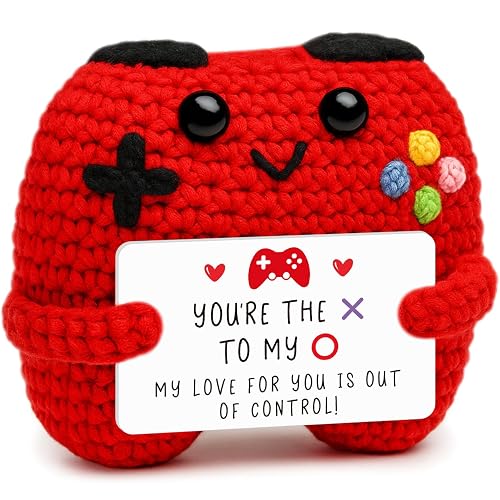
Valentine’s Day gifts for gamers can be practical or sentimental, and the best choices often combine both. A practical accessory shows you paid attention to how they play, while a small personal touch, such as a custom mousepad with a shared inside joke, signals that the gift is for them as a person. Pick one main gift and, if you want, add a small extra rather than piling on several items.
Practical Upgrades
Upgrades that reduce friction in daily play tend to be used the most. A better headset that fits comfortably for long sessions, a mouse with a shape that matches their grip, or a controller with a replaceable thumbstick cap can all improve the experience without changing the game library. Owners often report that comfort upgrades get used every day, which is the outcome you want from a gift like this. If you want more background, see Same-Day Christmas Gifts: What You Can Still Give Today.
Shared Experiences
If you play together, a gift that supports co-op can be the strongest choice. A second controller, a splitscreen-friendly accessory or a subscription that unlocks online multiplayer for both of you turns the gift into time spent together. Keep in mind that multiplayer subscriptions usually require an account on the same platform, so confirm both players are on it before buying.
Low-Key Personal Gifts
Some gamers prefer something that is not tied to a device at all. Consider a printed map or art from a game world they love, a board game that matches their taste in strategy or cooperation, or a card set from a franchise they follow. These gifts are easy to pair with a small card that references a moment from a shared session.
Common Mistakes to Avoid
- Buying the wrong generation. A controller or headset that works on one console may not work on the next. Check the model number, not just the brand.
- Ignoring the connection type. Many gamers already own a headset that works fine. Buying a second one with a different connection can leave them with an extra cable and no benefit.
- Gifting a game they already own. Check the library first, or ask a friend. Duplicate purchases are common and hard to return.
- Overbuying accessories. Five small items often go unused. One well-chosen item gets more use.
- Forgetting the gift receipt. Compatibility problems are easy to fix if you can exchange, so keep the receipt and packaging.
Recommended gear
These items are common, practical choices for gamers. Confirm the model matches the player’s platform before buying.
- Wireless controller for the player’s current console. A spare controller is one of the most useful gifts for couples who play together, and it keeps the gift tied to the platform they already use. View on Amazon
- Gaming headset with a detachable microphone. Detachable mics suit both competitive play and casual chat, and many headsets work across more than one platform. View on Amazon
- Controller charging dock. A dock keeps multiple controllers charged and off the floor, which is a useful upgrade for players who own more than one pad. View on Amazon
- Gaming mouse pad with a large surface. A wide mousepad gives PC players room for sweeping movements in shooters and strategy games. View on Amazon
Tips for a Better Gift
- Shop a few days early so you have time for compatibility checks and returns if needed.
- Pair the gift with a short note that names a game or moment you shared. Personal details often matter more than the item.
- If the gift is for a long-distance partner, check shipping cutoffs and consider a digital item that can be delivered the same day.
- For reading-related gaming gifts, see Valentine's Day Gifts for Coffee Lovers: 7 Best Picks (2026) if your partner also enjoys a warm drink during long sessions, since a coffee-related gift can pair well with a gaming box.
- If you are choosing among several options, compare them with Top 6 Coolest Gifts for Gamers: Expert Picks for Every Player to see which categories suit different play styles.
Gift Ideas by Player Type
If you still feel stuck, match the gift to the player’s main habit. A competitive shooter player usually wants audio and aim gear. A story-driven RPG fan may prefer something that supports long campaigns, such as a comfortable controller or a notebook for tracking quests. Explore Gifts for RPG Gamers: 7 Picks That Fit Long Campaigns (2026) for ideas tied to long-form play. A Minecraft fan might appreciate a build-themed item, which you can find in Gifts for Minecraft Gamers: 9 Ideas That Fit the Game (2026). Nintendo owners often enjoy handheld accessories, covered in Gifts for Gamers Nintendo: 9 Ideas Worth Giving in 2026.
FAQ
What is the best Valentine’s Day gift for a gamer who has everything?
A gift that improves comfort or sound is often the safest choice, since it upgrades something they already use every day. A personal touch, like a custom item tied to a game they love, can also work well when they already own most accessories.
Should I buy a game for a gamer as a Valentine’s Day gift?
Only if you know they do not already own it and you are confident they want it. Check their library first, and consider a gift card for their platform if you are unsure, since it lets them choose.
How do I know if a headset will work with their console?
Check the connection type and the platform support listed by the manufacturer. Some headsets work through a controller jack, while others need a wireless adapter or a USB connection. Confirm before buying. We also found Valentine's Day Gifts for Video Gamers: 6 Picks That Fit the Player useful on this point.
Is a controller or a headset a better gift?
It depends on how they play. Players who focus on single-player games often value a controller upgrade, while players in multiplayer games often prefer a headset. Use the setup and habit clues in this guide to decide.
What if I am buying for a partner who plays on PC?
PC players often care about the mouse, keyboard and monitor. Confirm their hand size and whether they prefer wired or wireless gear, and check that any software the accessory needs runs on their operating system.
How early should I buy a Valentine’s Day gift for a gamer?
Buy at least one to two weeks early when possible. This leaves time for compatibility checks and returns, and it avoids shipping delays near February 14.
Can I give a gaming gift to a casual player?
Yes. Casual players often appreciate low-pressure gifts like a comfortable pad, a snack-friendly tray for the couch, or a board game they can play together. Keep the gift simple and easy to use.
Conclusion
The best Valentine’s Day gifts for gamers come from paying attention to how someone plays: the platform, the genres, and the setup they already use. Check compatibility before you buy, keep the gift focused, and add a personal note that shows you know their habits. A thoughtful, well-matched gift will get used long after the holiday.
Ready to choose one?
About Colin Foster
Colin Foster is part of our editorial team and reviews and edits our gifts by interest guides, checking product details against manufacturer specifications and owner feedback.